

Before we get into how to open a new account, let’s first take a look at the statistics to understand why Google is so important.
- 1.5 Billion monthly traffic in Turkey
- The most used search engine in Turkey
- Owns 90% of the search engine market
- More than 2 trillion searches are done on Google annually.
- 44% of traffic to websites comes from Google
- 35% of product search traffic starts on Google
This shows us the importance of being in Google and using Google ads.
Opening a New Administrator Account
Search through Google in the form of Google Adwords My Client Center and click on the page that comes up, click on Create an administrator account on the screen that appears, and a screen asking for billing addresses will appear.
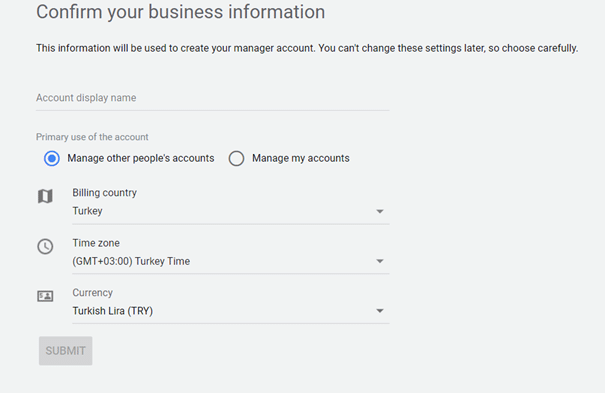
After filling in the required fields, click the “Submit” button. It’s that easy to open your admin account ?
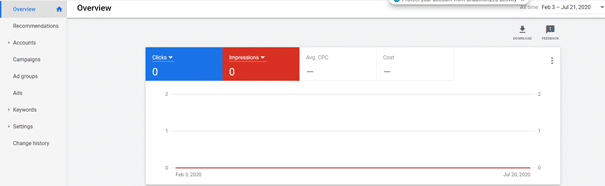
Thus, we have created your manager account with Google Ads. You can then link the accounts whose ads you manage here or open new ad accounts.
To add a new account to your manager account;
Below I write the steps to be taken in order;
- Accounts
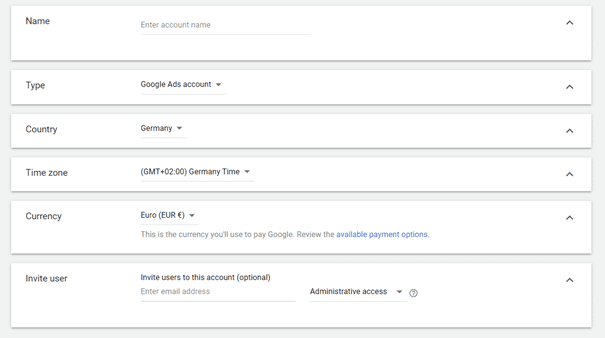
- Click the “+” sign and click Create a New Account
- You have to fill in the screen that appears. Fill in the Account Name, Type, Country, Time Zone, and Currency fields and click Save.
Let’s say you want to access your own company, brand, or customer’s advertising account, or you have opened a new account and you want to share it with your customer. In this case, what you need to do is come to the Accounts section, click the “+” sign, click on the ‘Connect Existing Account’ option, and enter your customer’s ID number on the screen that opens and click the Submit button.
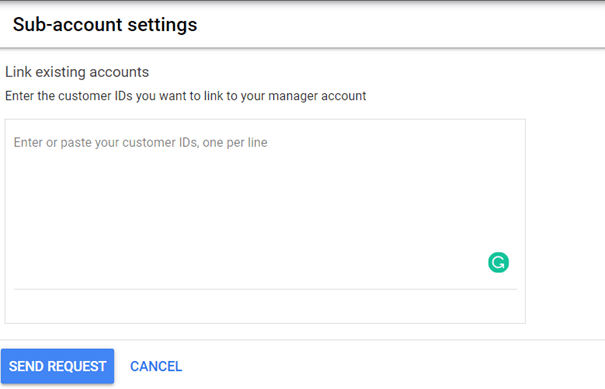
This will be all you need to do.
You opened your manager account, created a new account in it, and linked your client’s account. Now you can start advertising ?
Important Note: It is very important to enter the Country, Time Zone, and Currencies sections correctly when creating a Manager Account (MM) or a single account. Because; You will not be able to change them later. So make sure that this information is entered correctly.
Don’t forget to follow me on social media platforms for up-to-date information and tips from the world of Social Media, Digital Marketing, WordPress, and Funnel Marketing ?
See you in my next post!