


Here are the steps to activate the shop now button on Instagram;
- Your account must have a business profile. Your account must be switched to the business profile.
- Your account must also have a Facebook business page.
- You must link your Instagram business profile with your Facebook product catalog. You can create the Facebook catalog in two ways. First, you can create a store linked to your Facebook page. Second, you can create a catalog using the business manager.
- You must have the latest version of the Instagram application installed, make sure you have the latest version installed.
- Your account must be approved for shopping on Instagram before you can tag your products.
If you have created a new catalog, your created catalog will also be checked. After your catalog is approved, your account will be approved.
Steps to be done before Instagram product tagging;
- Sign in to your Instagram business account.
- Tap on “shopping” in business settings and tap on “Continue”.
- Your product catalog will appear. At this point, select your product catalog to link to your business profile. Before you come this far, your product catalog must be created.
- After selecting your catalog, tap “Done”.
After this process, you will now be able to tag your products on Instagram.
Important Note: If you do not see the shopping option in your account, your account is either under evaluation or has not yet been approved for shopping on Instagram. The review process usually takes a few days, but in some cases, they may want to review the account further. In this case, the confirmation process will take a little longer. If your account is approved, Instagram will definitely send you a notification.
How do you tag your products in your posts?
- First of all, you create your story post or post.
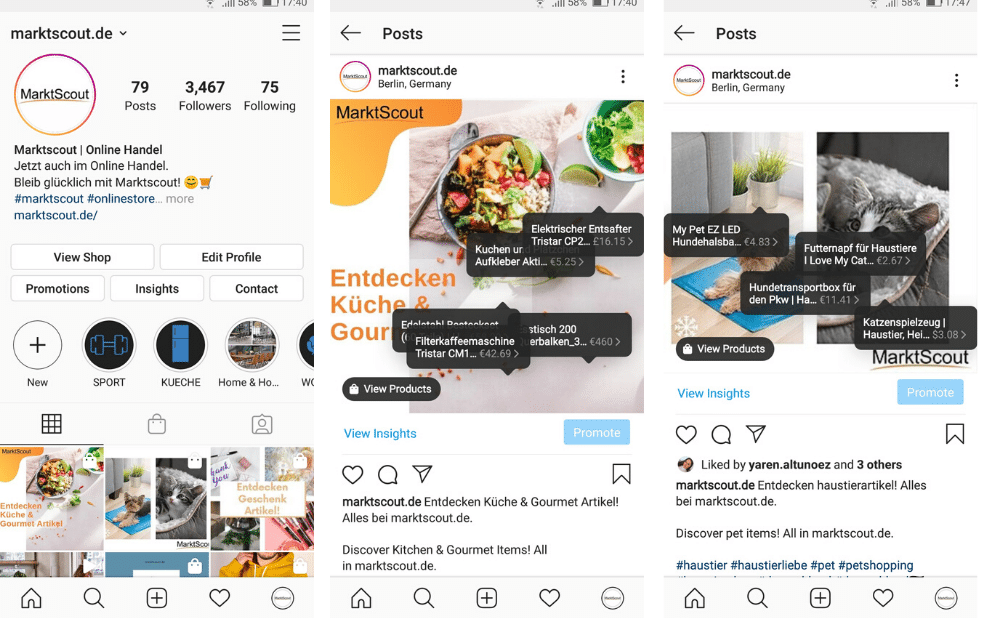
- Then when you come to the share screen, you click on the tag products option and select the product sticker/tag.
- Select the product(s) you want to tag from your catalog. Drag your label or sticker next to the product you want.
- Share your story/post.
If your Instagram shopping feature is not approved;
Make sure that everything is done completely and correctly. All of the products in your product catalog must be entered. Commercial principles must also be followed. If your account is not approved, you can contact Instagram.
Don’t forget to follow me on social media platforms for up-to-date information and tips from the world of Social Media, Digital Marketing, WordPress, and Funnel Marketing ?
See you in my next post!